Showing posts sorted by relevance for query to-do. Sort by date Show all posts

Saturday, April 12, 2008

ToDoManager is J2ME Symbian Free Software

ToDoManager is J2ME Symbian Free SoftwareToDoManager is a J2ME application that allows users to manage and schedule your personal to-do list. You can add, edit and delete to-do notes. Manage prioritise and deadline with alarm.

Main Features:
  • New: Enables to create a new to-do notes, specifying& ;prioritise and deadline with alarm.
  • View: View in summary selected to-do notes.
  • Edit: Edit selected to-do notes detail.
  • Delete: Delete selected to-do notes.
  • Delete Completed: Delete all to-do notes completed.
  • Preferences: Enables to view all to-do notes ordered by subject, deadline or prioritise.
  • Complete/Incomplete: Set to-do notes state to complete or not complete
Free Download: here

Tech Tags: , , , , freeware

Wednesday, November 15, 2006

File Sharing with S60

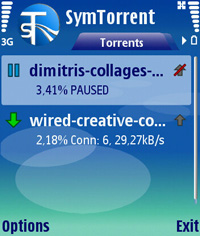
SymTorrent is a BitTorrent client for Symbian smartphones. BitTorrent is a very popular peer-to-peer file-sharing protocol used by millions of users worldwide.

SymTorrent is the first full-featured and complete BitTorrent client for Symbian OS. It supports downloading multiple torrent files at the same time, is capable of both downloading and uploading and can save the status of your unfinished torrents, so you can resume the downloads after restarting the application. You can also check the status of each file inside a torrent along with several other statistics and properties during download.

Currently, it is available for mobile devices based on the S60 Platform 3rd edition.

SymTorrent is free (and open source) software, distributed under the terms of the GNU General Public License. We highly appreciate any help. If you like this software and want to support the development of SymTorrent by making a donation, you can do so via PayPal.

You should also check out our other popular mobile file-sharing application, Symella, a Gnutella client for Symbian OS.

SymTorrent for S60
SymTorrent for S60 3rd edition 1.10 install (SIS only) (170 kB) - for devices like Nokia N80, N91, E60, etc.
SymTorrent for S60 2nd edition 1.10 install (SIS only) (55 kB) - for devices like Nokia 6600, 6630, N70, etc.

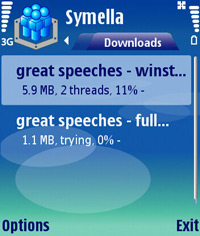
Symella is a Gnutella client for Symbian smartphones. Gnutella is a popular Peer-to-Peer file sharing network with several users from all around the world. (for PC Gnutella clients check this site).

Symella supports multi-threaded downloads which means that if multiple users have a particular file then Symella can download the file from several locations simultenously.

Currently, it is available for mobile devices based on the S60 Platform 2nd and 3rd edition.

Symella is free (and open source) software, distributed under the terms of the GNU General Public License. We highly appreciate any help. If you like this software and want to support the development of Symella by making a donation, you can do so via PayPal.

You should also check out our other popular mobile file-sharing application, SymTorrent, a BitTorrent client for Symbian OS.


Symella for S60
Symella for S60 3rd edition 1.32 install (SIS only) (137 kB) - for devices like Nokia N80, N91, E60, etc.
Symella for S60 2nd edition 1.32 install (SIS only) (47 kB) - for devices like Nokia 6600, 6630, N70, etc.

WizBit is a BitTorrent client for Symbian S60 smartphones (such as the Nokia 6680, 7610, 6600, N70, N80, N91 or many more). It uses Python, which is available for free.It is currently not complete. It does not fully work yet and is only suitable for alpha release.

Requirements
You will need a S60 (Symbian) phone. WizBit should work OK on all the devices here. WizBit requires the SHA algorithm to work, free from the PyPy library. WizBit should install and run fine on most S60 devices with Python installed.

Files
WizBit.py note: this is an alpha version. You will need Python experience to get it doing anything. It does not download files yet. It can currently connect to a tracker and retrieve a list of peers. Sha.py (from the PyPy library)

Installation
Make sure you have Python installed on your phone (or emulator). Either download the 2 .py files above with your phone or download them on your computer and transfer them to your phone. Open the 2 files, the sha.py should be installed as a library and the wizbit.py should be installed as a normal script.

Run Python from you phone main menu and go to run script from the menu. Choose WizBit.py and wait for it to load.

Sometime soon I hope to package WizBit as a .sis installation file (with an icon!) to make installation much easier. WizBit will then be runnable from the phone's main menu.

Screenshots
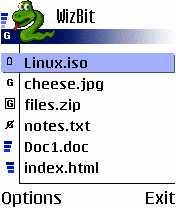
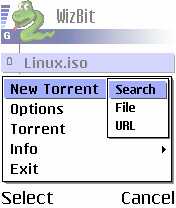
This is just screen shots of the front end. Not all the features are implememnted in the back end yet. The icons for the files are currently just random, but I'll make some nice meaningful ones at some point.


A list of files to download. The user can choose a file and see progress.

Choosing how to start a new download.
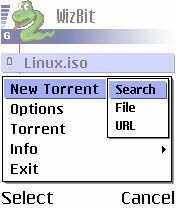
Searching for a torrent file. This currently uses Mininova, but I'll put in more search sites at some point.
Licence
WizBit is free to download and use. WizBit is licenced under the GPL. Feel free to modify it, use it or change it. The GPL requires you to release any source code you modify.
This software is provided with no guarantee of anything. It may break your phone and make it explode (it shouldn't). I accept no liability for any consequences.

Wednesday, January 17, 2007

ADnota memo for Symbian OS Series 60

Multimedia Memos

With the ADnota memo creating voice memos is as easy as child's play. And they're quite a show thanks to the mulitmedia integration of photos, video clips and text notes.

ADnota memo Key Features
Easy Recording of Voice Memos
Multimedia Integration

Going beyond the usual voice only memos, the ADnota memo allows you to enrich recordings with photos, video clips, sound clips and text notes. Or - from a photographer's point of view - to create a photo gallery with audio comments.
Messaging

To share your data with others or to transfer it to other devices the ADnota memo features various communication channels. You may send memos or parts of them via MMS or e-mail making your ADnota memo a convenient Multimedia Messaging Editor.
Search

For easy retrieval ADnota features date and text search.
Categorisation

For friends of classic folder oriented categorisation the ADnota memo also supports pre-defined and user-defined categories. The "To-do", "Shopping" and "Ideas" folders give the casual user an easy start. Others may create e.g. a "diary" folder to house a multimedia diary or maintain a "citations" database.
Dictation Oriented Interface

The ADnota memo's easy-to-use interface is designed to keep keypad action to a minimum while being intuitive and reflective of the important functions. The navigation diagram displays the different actions assigned to the moving senses of the scroll key/joy pad. Content specific icons provide a quick qrasp of all views.


At present, versions for the mobile phones

  • Nokia 3650,
  • Nokia 3660,
  • Nokia 7650 and
  • Nokia 6600
are available.

Download free for Nokia 6600 V 1.01
Download free for Nokia 3650 / 7650 V 1.01

Sunday, February 18, 2007

S60 Internet Radio

This is a reference implementation of HTTP Internet Radio streaming (Shoutcast) for S60 2nd and 3rd Edition devices. It is intended primarily as a learning tool for the S60 developer community. We also hope to stimulate the creation of innovative S60 audio applications.

The S60 Internet Radio reference application is a fully working example of an audio application developed for the S60 platform. The application supports SHOUTcast streaming audio playback. Currently, MP3 and AAC+ streams are supported.

The application also supports local playback of audio files in the following formats: MP3, AAC, eAAC+, MP4, M4A, WMA, 3GPP, AMR, and WAV. Note that some formats may not be supported on some S60 products. This is dependent on the codecs that are available on specific phone models, and is not a limitation of the reference application.


License
This code is available for use under the terms of the BSD license
Downloads

Please install the two programs below on your S60 phone. Most 3rd Edition phones can use either version (.SIS or .SISx). E-Series phones should use the .SISx version.

S60 3rd Edition

Nokia 3250, E60, E61, E70, N71, N73, N80, N91, N92, N93

Shoutcast engine (.SISx)
Internet radio client (.SISx)

Shoutcast engine (.SIS)
Internet radio client (.SIS)

S60 2rd Edition, Feature Pack 3

Nokia N70, N72, N90

Shoutcast engine
Internet radio client

S60 2rd Edition, Feature Pack 2

Nokia 6630, 6680, 6681, 6682

Shoutcast engine
Internet radio client

Helpful hints
Playlists
When the S60 Internet Radio application is installed, an example playlist (shoutcast.pls) will be installed to the \Shoutcast directory of the installation drive. You can try out the application with this sample of stations.

Please note: Stations that broadcast in AAC+ will not work on S60 2nd Edition phones.

Please note: If you cannot connect to a station, it is because the station cannot accept any more connections at the moment. Some of these stations are maintained by amateur broadcasters, who do not have much bandwidth at their disposal. Please try the station again later. This is not a problem with the Radio client. We have tested the client with all of the stations in the default playlist.

You can also create and install your own playlists for the Radio app to use. The Shoutcast plugin will search for playlists in the \Shoutcast directory of every drive on the device. Found playlist(s) will be automatically parsed and added to the playlist menu.

To create your own playlist, you can use Winamp (or another similar program) to import and modify the default playlist, or to create your own playlists of Shoutcast radio stations. Export the playlist to a .pls file, and copy one or more playlists to the Shoutcast directory. When you open the application, the stations in all playlists will be available for selection.

For example, here is another playlist that you can add to your device to see how this feature works.
It also plays files!

This reference application can also play your music files. Select Change Mode->File Player from the Oprions menu. You can now select files to play through Options->Open File->(directory on device).

Thursday, June 14, 2007

ReadManiac is bookreader midlet for mobile phones.

ReadManiac is bookreader midlet for mobile phones.ReadManiac is bookreader midlet for mobile phones. With ReadManiac, you can search, download and read books using practically any mobile phone with JAVA support.

Midlet comes in two versions: Standalone application (ReadManiac FULL) and midlet with emebeded book (ReadManiac LITE).

Standalone application (ReadManiac FULL) is installed to phone once, and than used to search, download from internet and read books without a help of PC. Midlet has dedicated search engine for searching books in several on-line libraries. ReadManiac download these books directly to phone's memory. Once installed, it becomes library in the pocket.

Midlet with embeded book (ReadManiac LITE) is built with ReadManiac Building Wizard on PC. Wizard embeds selected book into midlet. Resulting midlet that can be installed to phone and used to read embeded book.

ReadManiac aims to be Commercial Quality Freeware.

Features:
  • ReadManiac FULL can search and download new books from internet - and this makes it a true library in the pocket;
  • Besides standart phone's fonts, ReadManiac can use custom small fonts for comfortable reading on small phone screen, including ability to create and embed user fonts;
  • Program has powerfull options for text formating, allowing to use a small phone screen in full;
  • Bookmarks and search features are supported;
  • On Siemens phones, and phones with JSR-75 or Motorola FileAccess API, ReadManiac FULL has a build-in file browser to access phone's filesystem. Text file size is limited only by available space in FLEX memory or on MMC card;
  • TXT, ZIP, PDB, PRC and TCR formats are supported;
  • package comes with easy to use Midlet Building Wizard;
Download: ReadManiac comes in a form of Install Package. Package installs ReadManiac Building Wizard application, documentation and tools. Please use Wizard to build customized midlet version for your phone, and install midlet via cable, IRDA or bluetooth.
Current version is 2.5.2. Download it ReadManiacSetup.exe
WAP download: If you do not have cable or cradle to upload from PC to phone, you can download pre-built midlet from WAP page: http://wap.readmaniac.com/en/

Sunday, February 04, 2007

Take all your favorite Web sites on-the-go with Opera Mini!

Surf the Web, search on Yahoo!, read webmail from the palm of your hand. Get Opera Mini, a free Web browser for your mobile phone.

Take all your favorite Web sites on-the-go with Opera Mini!Mini technology
Opera Mini uses a remote server to pre-process Web pages before sending them to your phone. Web content is compressed to reduce the size of data transferred, enabling handling on simpler phones and creating fast browsing at low costs.

Opera Mini Feature
  • Get all RSS news on your phone. Subscribe to your favorite RSS news feeds and every time you connect with Opera Mini all updates are just one click away. Sort the articles by feed source or by date
  • Point, snap, publish. Share a picture from anywhere, anytime with your phone using Opera Mini's photo sharing feature. Upload your photo to a blog or forum, or as an e-mail attachment. Photo sharing just got easier.
  • Get stuff. With Opera Mini you can download files directly to your mobile phone from the Web. Get all the sound bytes, images, documents and applications straight from the site.
  • Safe and sound. Do even more online with Opera Mini. Secure connections will now let you safely use secured sites, such as your e-mail, bank site, online stores, with no exposure of your personal details.
  • And now even faster. All subsequent requests to a server within a session are now quicker. Opera Mini keeps an open connection between server and client reducing overhead TCP set-up times

Take all your favorite Web sites on-the-go with Opera Mini!Take all your favorite Web sites on-the-go with Opera Mini!

Choose one of the three methods available to get Opera Mini on your phone.

Download to PC
Download using WAP
Download using SMS link

Opera Mini Simulator
To see Opera Mini in action or to check out how your Web page looks on a small screen, feel free to use our updated online Opera Mini live demo.

Thursday, December 25, 2008

KankaMSN - MSN messenger for Series 60

KankaMSM is an instant messeging software that enables you to chat with your mobile phone. You can chat everyone who uses MSN or Windows Live Messenger with KankaMSN. Besides KankaMSN is the least GPRS data consuming software in the market. So that you can enjoy spending minimum credits even you chat for hours with your friends.
Application Specifications:
  • Clear Software: KankaMSN is the most clear software in the market. While you use KankaMSN you can see the data usage on the up-right corner of the screen. So that you can always calculate your spending.
  • Send Picture: You can also send a picture that you took with your mobile phone’s camera. Only thing you have to do is to click ‘Menu’ and then ‘Send Picture’.
  • Find new Friends: KankaMSN enables you to find new friends among other KankaMSN users. After inserting you details such as nick, sex, age information; you can wait for other KankaMSN user to contact you or you can look for other user according to your criteria.
  • Themas: KankaMSN Version Beta 0.4 comes with 10 different themas.
  • T9 Instant Messeging Support: For fast instant messeging KankaMSN serves T9 support to you.
  • Vibration and voice alerts:KankaMSN informs you via voice alerts and/or vibrations. So that you will be informed with new messeges even you don’t look at you mobile phone’s screen.
  • Playing Video and Music files:With KankaMSN you can play the audio and video file links that your friends send.
  • Save Conversation History: If you wish you can save your chat history of your friends to your mobile phone. So that in the next chat sessions you can see your messeging history.
Free Download: kankamsn.jad and kankamsn.jar

via: rodrigostoledo.com

Thursday, September 20, 2007

Quake for S60 3rd edition FP1

Quake for S60 3rd edition FP1 This is a port of the infamous first person shooter for the S60 3rd Edition FP1 based phones. The only thing that is not working is network play.
This port requires an S60 3rd Edition Feature Pack 1 phone (e.g. N95 or E90) and ARMv6 processor. It will not work on older S60 3rd Edition (non-FP1) phones. You need to install PIPS C Runtime libraries for this software to work.
Installation
1. Find a suitable datafile (either shareware, or the full version form original PC version)
2. Create "quake1" folder to the root of your memorycard
3a. If you have the full version, just copy the "ID1" directory to "quake1" directory.
3b. If you have only a shareware .pak file, create "ID1" folder to "quake1" directory and the copy the shareware pak-file there
4. If you want to have cdaudio aswell, create "cdaudio" folder to the "quake1" folder. Then put the audio files as .mp3 to the "cdaudio" folder, remember to rename the files from 1.mp3 throught 10.mp3. I don't know what bitrate is the best, but I have used 256kbps and it has impact of 0.1 fps to the performance. If you do not have the required audio files, the background music is just not played.
5. install the Symbian P.I.P.S. c-runtime library, and the install the suitable version of quake.

Download
quake_v101_armv6_fpu.sisx - this version is for phones which have a floating point unit (ie. N95)
quake_v101_armv6_nofpu.sisx - a non fpu build for phone without fpu (ie. 6290)
pips_s60_wp.sis - Symbian P.I.P.S. C-Runtime library. Required by both of the game versions
Links:
Author homepage
List of S60 3rd edition FP1
Video form youtube

via: my-symbian.com , nokia-news.ru

Friday, January 05, 2007

MM Revers is a free boardgame for Series 60.

Reversi or Othello is a well known boardgame. It's easy to play, but a challenge to win - and really this version is a challenge.
The board consists of 8x8 fields, the two players alternately put white and black stones onto the board. Your goal is to have the most stones at the end of the game. To do so, directly enclose your white opponent horizontally, vertically or diagonally. All surrounded stones become yours - change to your black color. If you cannot surround stones, you have to pass. The game ends if the board is full or you and the computer have to pass.


Download MM Reversi
English-Version
Deutsche/German Version

Thursday, April 17, 2008

ShoZu makes your world mobile

ShoZu makes your world mobileShoZu - Connecting your phone and your online life has never been easier. With ShoZu you can interact with huge list of sites and communities – from Flickr to Facebook, YouTube to Blogger, the list goes on.
Main Features:
  • Upload Photos & Videos. ShoZu enables one-click uploading of camera phone videos and pictures to over 30 online social networks, blogs, photo sites and other popular web destinations.
  • Add Tags, Titles and Descriptions. Keep your photos and videos organized online with tags or do a little moblogging with descriptions. With ShoZu you can add tags, titles and descriptions before or after uploading your photos and videos.
  • Geo-tagging. Have a GPS enabled phone? ShoZu can geo-tag your photos and videos
New Features:
  • Update your Status. Away? Keep your friends in the know while you’re on the go. Change your status for your different accounts direct from your phone with ShoZu.
  • Enhanced Interactive Commenting. Read & reply to comments from your phone. Posted a fun photo to your online profile last night? As your friends post comments, they’re sent to your phone where you can read and reply to them all.
  • Download Friends’ Feeds. With ShoZu you can get your friends’ Flickr photos on your phone. Every time your friends add new photos to Flickr, they’re instantly sent to your phone so you’re always in the know.
Free Download: here

Tech Tags: , , , , freeware

Thursday, August 21, 2008

Winamp, MPC and VLC Remote program for Mobile phones

Winamp, MPC and VLC Remote program for  Mobile phonesRemote'EmAll is a remote control program for Winamp, Media Player Classic (MPC) and VLC Videolan Player. It uses network (GPRS,EDGE,3G,WLAN) to send commands to PC. It works on phones and mobile devices which support J2ME (Mobile Java MIDP). It has been tested with few Nokia phones, but it should work on any phone supporting Java MIDP2.0.

This software does not support bluetooth. There are no plans to support it in future either.

Remote'EmAll is still in beta, so if/when you find bugs or want to request new features, just send me email. New remotes can be made quite easily if program supports some kind of http or web interface.

Features:
  • Basic controls for Winamp, MPC and VLC (play,pause,stop,next,prev)
  • Playlist control in Winamp and VLC
  • Few special commands in each remote
  • Socket-server to provide fast search and realtime filesystem browsing
  • Make your own custom commands with socket-server
  • Control almost anything in your computer (as long as you can do it by cmd commands or scripts)
What is needed to make it work:
  • Winamp 2 or higher
  • HttpQ-plugin for Winamp
  • PC with internet connection and WLAN/3G/EDGE/GPRS to mobile device. Data is transferred with http and socket protocol.
  • Perl if you want to use search and browse functions.
  • Media Player Classic (MPC)
  • VLC VideoLAN Player
Free Download: here

Friday, December 05, 2008

RockeTalk - Meet new people using voice chat and more

RockeTalk - Meet new people using voice chat and moreRockeTalk is a downloadable application that lets you send any combination of text, voice, pictures, audio or video, as a message to anyone (or group), anywhere in the world, from any mobile phone or computer to any other mobile phone or computer.

What can RockeTalk do for you?
  • Meet New People: Meet exciting new people right on your mobile phone.
  • Instant voice & picture chat: share your world with your new and existing friends using voice, and picture chat
  • Free galleries & mobile downloads: Step in to our free galleries and view amazing content posted by other users, or post your own creations. Download loads of cool stuff for your phone...ringtones, videos, wallpapers and more!
  • Vibrant communities: Join one of the vibrant communities buzzing with voices, pictures and more. Or start your own community.
  • Instant messengers: Connect to your instant messengers like Yahoo!, MSN & Google Talk! No need to stay attached to the desktop to stay connected with your friends!
Free Download: just Point your mobile browser to: m.rocketalk.com

Saturday, December 02, 2006

Bantumi GL is free classical game

Bantumi GL OpenGL and OpenGL ES version of the classical game, licensed under GPL

Game history
Bantumi is derived from a game called "Mancala" that originated in Africa, thousands of years ago. There are many variants of the game, from the number of stones in each tray at the start of the game through to how each of the stone is actually won.
Rules of the game
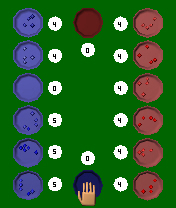
The objective of the game is to move your stones from the trays at the bottom of the screen into your mancala on the right hand side. The following rules apply to the bantumi game you can download on this page.
  • The game always moves counterclockwise.
  • After you have made your selection, each tray increases by 1 counterclockwise, until all the stones you picked up have been used.
  • You cannot drop any stones into your opponents mancala.
  • If your stone arrives in your mancala, your score increases by 1.
  • If your last stone arrives in your mancala, you have another move to do.
  • If your last stone arrives in an empty tray in the bottom half, it is added to your total, and any stone in the opposite tray are added as well.
  • If either player is left with no stone in their trays, the game is over. If the other player still has stones, they are added automatically to his mancala (player - machine).
  • The winner is the player with the highest number of stones in his mancala.


Download Bantumi

Wednesday, April 30, 2008

Sunclock is a J2ME Midlet that displays a map of the Earth

Sunclock is a J2ME Midlet that displays a map of the EarthSunclock is a J2ME Midlet that displays a map of the Earth and indicates the illuminated portion of the globe by drawing sunlit areas dark on light, night areas as light on dark. In addition to providing local time for the default timezone, it also displays up to four additional cities on the map with the local times also. The map updated every minute to follow the movement of the earth.

Using the Setup menu you can choose the cities according to your interest. You can give the DST rules for the chosen city. If you have internet access on your handset you should search the city using the "Search" menu and the remote service will find the proper DST rule settings for you. Otherwise you should use the provided online DST rule search service on the top right corner of this page. You have to specify the correct timezone values relative from GMT (for example +5.5hours will appear as 530) and the integer WGS-84 coordinates multiplied by ten (N14.7432 will be lat: 147) of the cities to display them on the map. Thus most of the current phones do not supports the timezone settings, the localtime will be calculated based on the Main City setup and the internal phone clock will be interpreted as a timezone corrected local time value according to the Main City timezone selection.

Free Download:
Sunclock128.jar - midlet for 128 pixel wide screens
Sunclock176.jar - midlet for 176 pixel wide screens
Sunclock220.jar - midlet for 220 pixel wide screens
Sunclock240.jar - midlet for 240 pixel wide screens
Sunclock320.jar - midlet for 320 pixel wide screens

Tech Tags: , , , , freeware

Monday, January 15, 2007

Best vCard for Series 60

A vCard automates the exchange of personal information typically found on a traditional business card. vCard is used in applications such as Internet mail, voice mail, Web browsers, telephone applications, call centers, video conferencing, PIMs (Personal Information Managers), PDAs (Personal Data Assistants), pagers, fax, office equipment, and smart cards. vCard information goes way beyond the simple text and includes elements like pictures, company logos, live Web addresses, and so on.
Why do I need it?
  • You can export your contacts from your PC Contacts manager (almost all known programs dealing with contacts are compatible with this format) and then import them to your phone easily with the help of Best vCard in convenient, customizable and entirely controlled way.
  • You can also export selected phone contacts to .vcf file that is easily imported to your PIM, Contacts manager, eMail client or any other program of that kind.
  • Maybe you want to make a backup for your contacts? Just export your contacts and you will be able to import them again to your phone when they are needed.
  • With the help of this program you can transfer contacts from Nokia 9210 to your Nokia 7650/3650.


Compatible devices:
Nokia 3230, Nokia 3650, Nokia 3660,Nokia 6260, Nokia 6600, Nokia 6620,Nokia 6630, Nokia 6670, Nokia 6680, Nokia 7610, Nokia 7650, Nokia N70, Nokia N90, Nokia N-Gage, Panasonic X700,Panasonic X800, Samsung SGH-D730, Sendo X, Siemens SX1
Download SIS file (35.28 KB); Version 1.01; English, German Languages
Download ZIP file (34.29 KB); Version 1.01; English, German Languages

Compatible devices:
Nokia 9300 communicator, Nokia 9300i communicator,Nokia 9500 communicator
Download SIS file (46.55 KB); Version 1.00; English Language
Download ZIP file (46.04 KB); Version 1.00; English Language

Compatible devices:
BenQ P30, Motorola A9xx/A1000,Sony Ericsson P800/P802, Sony Ericsson P900,
Sony Ericsson P910
Download SIS file (33.15 KB); Version 1.01; English Language
Download ZIP file (32.63 KB); Version 1.01; English Language

Friday, June 01, 2007

MobileOrganizer for Symbian Series 60 devices

MobileOrganizer is a PIM (Personal Information Management) application for Symbian Series 60 devices. This application is able to store text and voice messages and to notify the user about them when the date and time is right. The user can view all the messages in a special list from which he is able to display, edit and change their settings. Notesí settings are: Type, Date, Time and Repeat. There are two types of notes, ToDos and Reminders. The ToDo note doesn't have a time setting and it is only visible in the list view. This type of a message doesn't generate an event and user won't be notified about it. A reminder note has an activation time setting to alarm the user. The reminder can also have a repeat setting. By default, repeat is set to "Do not repeat", but the user can select other available options such as "Every day", "Every week", "Every month".

Functions:
  • Remembering voice and text messages
  • Viewing and editing notes
  • Setting notes parameters
  • User notification
Download free forSeries 60 2nd Edition: organizer_symbian8.sis (Nokia 3230, Nokia 6260, Nokia 6600, Nokia 6620, Nokia 6630, Nokia 6670, Nokia 6680, Nokia 6681, Nokia 6682, Nokia 6680, Panasonic X700, Panasonic X800, Samsung SGH-D720, Samsung SGH-D730.)

Monday, December 08, 2008

amAze - Free GPS navigation for your mobile phone!

amAze - Free GPS navigation for your mobile phone!amAze is a free mobile local search and navigation application. It enables you to view high resolution maps in many places over the world, to have voice guided navigation to any destination (if you`ll also have a GPS), to search in local search directories databases, to view weather forecasts and more. It is a very useful daily tool for everyone. You do not need to own a fancy smart phone to use it, since amAze can run on any Java enabled regular phone. Additional mobile phone platforms will be supported soon.

Free Download: here

Sunday, October 04, 2009

Hexxagon Labs for Nokia Series 60

Hexxagon Labs for Nokia Series 60Hexxagon Labs is the amazing logic game, which contains over a dozen arenas filled with intellectual challenges where you are able to compete with computer rivals or play with your friends!

Funny chemistry, witty physics, exciting astronomy… Do you think that there are no such things on our planet? If so, you haven’t play Hexxagon Labs yet! Just drop in to the most unusual laboratory in the world and test the power of your mind! This amusing tactical logic game includes 15 original hard-to-solve levels. The goal of the game in each level is to occupy as many cells on a field as possible, capturing pieces of an enemy. Your rivals will be the best American and European professors whose brains were implanted in the game’s artificial intellect system. You also will have an opportunity to play Hexxagon Labs with one or two friends using only one device!

In addition, Hexxagon Labs is full of interesting facts and entertaining material. Before every level you will receive new astonishing scientific information giving you the opportunity, when you have the chance, to show off your erudition and amaze acquaintances by your knowledge.

The more you play Hexxagon Labs, the smarter you will become!

Free Download: here (for S60)
here (for uiq)

Saturday, May 10, 2008

Nokia Step Counter

Nokia Step CounterEver wanted to how much you walk or run as you go about your daily life? The Nokia Step Counter not only counts your steps, it also determines the distance you have covered and your energy expenditure. You can even compare your activity levels on different days by looking up the summaries stored in a handy diary.

Want to know how it all works? Your steps are measured by analyzing the output from an accelerometer in your S60 mobile device. All you have to do is carry your phone around with you whenever you move, for example in a pocket of your clothing, attached to a belt or your upper arm, or in a handbag worn over your shoulder.

Free Download: NokiaStepCounter_beta_v021.sisx
(support device: Nokia N95, N95 8GB, and N82.)

Tech Tags: , , , , freeware

Wednesday, August 08, 2007

Use your camera phone as a Webcam

WWIGO (pronounced 'vigo') stands for Webcam Wherever I Go. With wwigo, a camera phone can be used as a webcam with PC or Laptop using bluetooth as the transmission medium. It is free.

It consists of two software components.

  • mobile component that resides on phone and streams video to PC.
  • PC component that recieves video.


Features
  • Use Camera Phone as Wirless Webcam
  • Record videos with wwigo PC application.
  • Use along with skype yahoo messenger windows live messenger to do video chat.
  • Live Upload with YouTube grouper to share video.
  • Video Quality better or comparable to off shelf webcam
  • Works with popular Bluetooth Stacks on PC
  • Supported devices Nokia Series 60 v2.0 and Series 60 v3.0 phones
System Requirements.
  • Desktop/Laptop with Windows 2000 or Windows XP SP2
  • Bluetooth enabled with any one of these bluetooth Stack, Microsoft Bluetooth Stack, Widcomm Bluetooth Stack, Toshiba Bluetooth Stack
  • Mobile Phone : Nokia Series 60 v2.0 or v3.0 phone.
Download wwigo (for download you need registration)
Supported devices Nokia: 6600, 6630, 3230, N70, N70music, 6260, 6620, 6670, 6680, 6681, 7610, N73, N80, N71, N93, E70, E61, N95